Payload to close a job.
Close
CityFibre - Partner Installation
Introduction
FTTH/P Installation
Installation Closure Codes and Description
Installation Secondary Closure Codes and Description
Installation Question Based Closure
Property Flags
ONT Provisioning
Integration sequence diagrams
Authentication
Network Configuration
Notify
Installation
CityFibre - Partner Installation (1.0.0)
CityFibre has implemented an automated process to accommodate the dispatch of Job Packs related to the installation of FTTH/P services. This requires the Partner to follow the same process in terms of the integration points, message types and message payloads relayed between each party. The implementation is based on JSON over RPC and has a common definition for inbound and outbound calls.
Standard Installation Flow
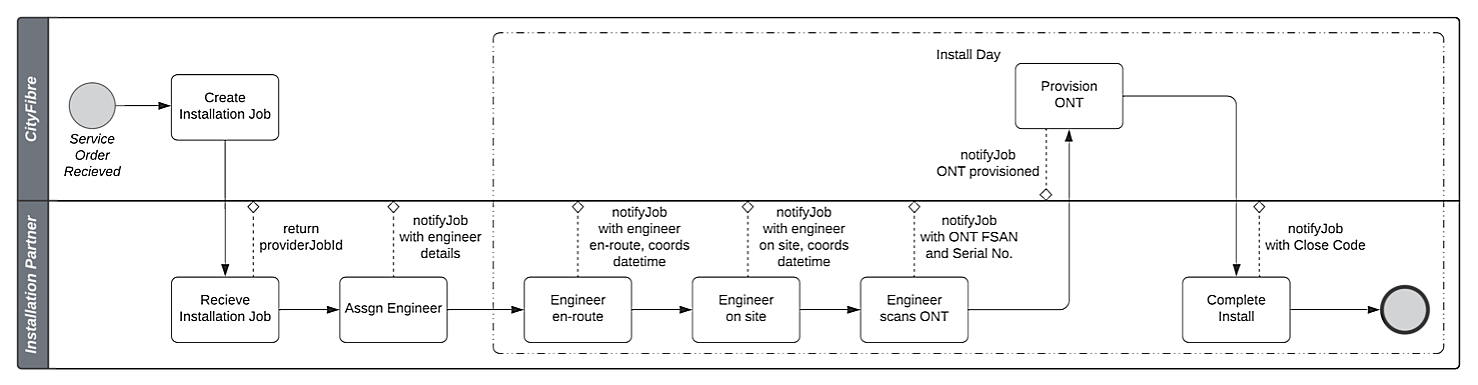
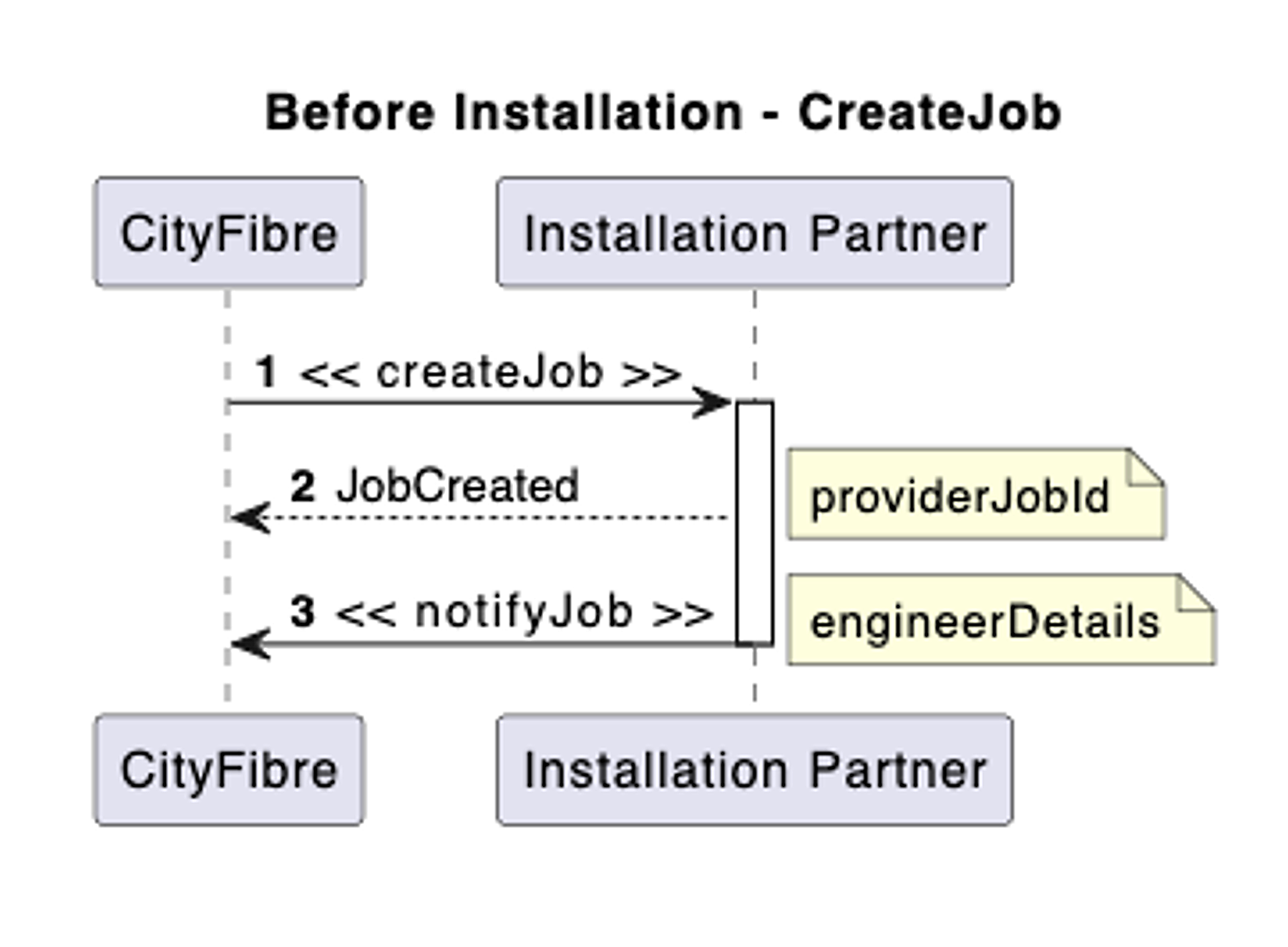
- CityFibre sends createJob for each job pack due. N.B. this can be at any point from when the Service Order was received to the day prior to installation.
- Installation Partner responds with providerJobId
- Installation Partner assigns the job to an engineer and sends notifyJob with Engineer Details
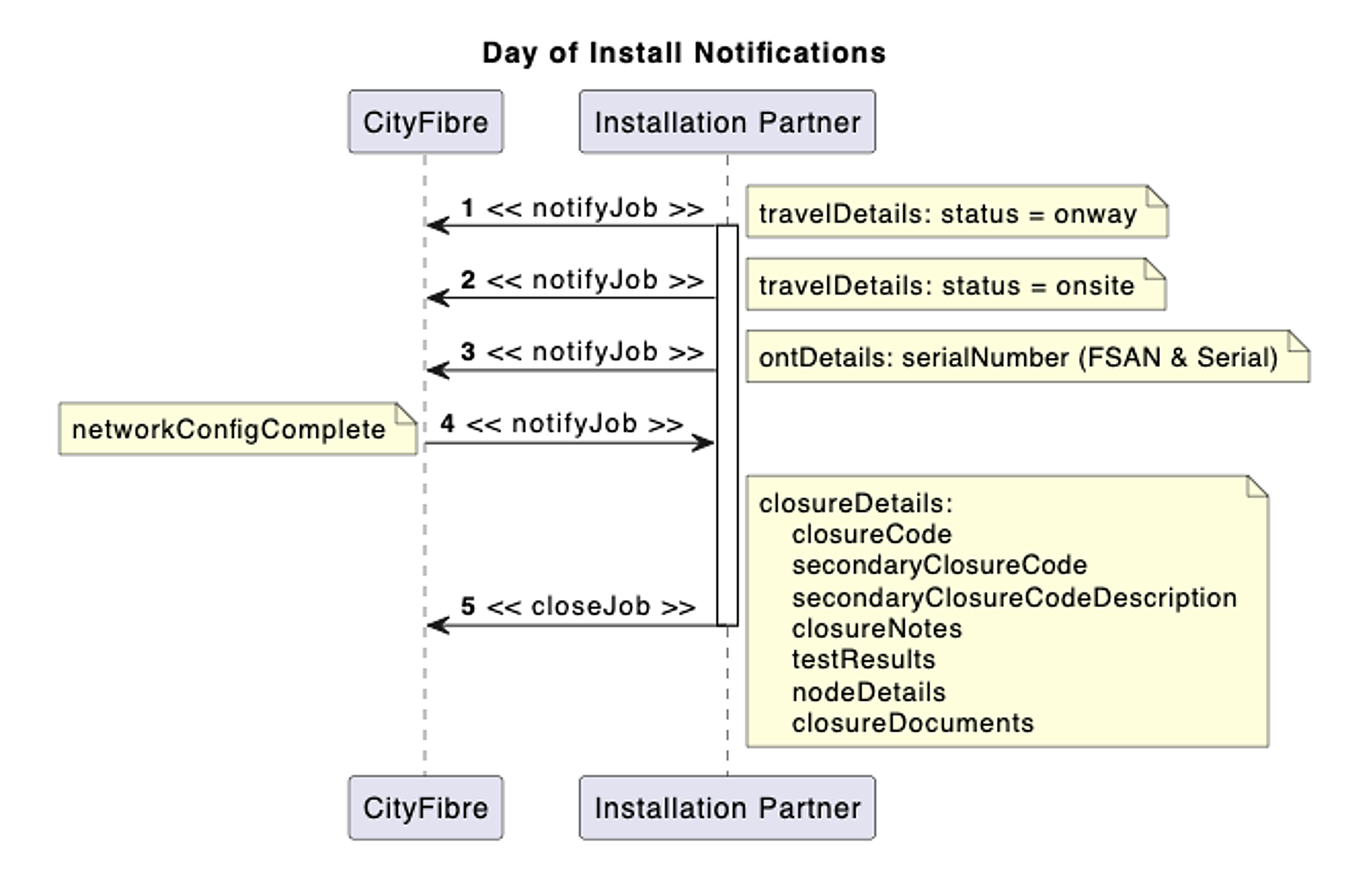
- On the day of installation
- Installation Partner sends notifyJob when the engineer has indicated that they are en-route to the installation with coordinates/time
- Installation Partner sends notifyJob when the engineer has indicated that they are onsite with coordinates/time
- Installation Partner sends notifyJob when the Engineer scans QR Code on the ONT, with the ONT FSAN and Serial Number
- CityFibre sends notifyJob when ONT is provisioned
- After additional install steps/tests, Installer sends back closeJob with question based closure and appropriate close and secondary close code with description
| Closure Codes | Description |
|---|---|
| SP | Service Provided |
| PSP | Partial install, CPE Install failed |
| HAZ | Site Unsafe |
| RNA/NA | No Access (Rectifiable) |
| NAPUV | No Access (Not Rectifiable) |
| ASQ | Sales Query |
| UNF | Unforeseen Circumstance e.g. Tree Line of Sight |
| MBORC | Unable to Attend (Notice Given) |
| FTA | Unable to Attend (No Notice) |
| CON | Fault at Node (or between Toby and Node) |
| POP | Fault at POP (or between Node and POP) |
| ONT | Fault at ONT or between Toby and ONT |
| CPR | Fault at Pole (Cherry Picker required) |
| NTR | No Truck Roll |
| REVCOMP | Success |
| REVCPR | Fault at Pole (Cherry Picker Required) |
| REVASQ | Sales Query |
| REVHAZ | Site Unsafe |
| REVNA | No Access |
| REVUNF | Unforeseen Circumstance e.g. Tree Line of Sight |
| REVPOP | Fault at POP (or between Node and POP) |
| REVCON | Fault at Node (or between Toby and Node) Traditional build - CF Network |
| REVONT | Fault at ONT or between Toby and ONT |
| REVASS | Additional Assistance |
| EXTCOMP | Success |
| EXTHAZ | Site Unsafe |
| EXTCON | Fault at Node (or between Toby and Node) |
| EXTPOP | Fault at POP (or between Node and POP) |
| EXTASQ | Sales Query |
| CIVCOMP | Civils Complete |
| CIVCON | Civils Restriction |
| CIVNA | No Access to Network |
| CIVWAY | Permission Refused |
| CIVQUO | Quote Not Approved |
| Other reason | Other codes sent, we will process as ‘Other reason’ |
The codes and descriptions below should be included on the closeJob notification when closureCode is either CON or POP. The secondary closure code provides additional detail as to the closure reason.
| Closure Code | Secondary Closure Code | Secondary Closure Code Description |
|---|---|---|
| CON | CON01 | Incomplete Network |
| CON | CON02 | No Infrastructure present |
| CON | CON03 | Openreach D Pole |
| CON | CON04 | No Capacity at SN/ASN Available |
| CON | CON05 | Toby Move required |
| CON | CON06 | Line of Sight issue |
| CON | CON07 | Blockage - Gel Wrap |
| CON | CON08 | Blockage - Lead In (Openreach) |
| CON | CON09 | Unable to blow fibre between the Secondary Node cab and Toby |
| POP | POP01 | No Light (SN/PN) |
| POP | POP02 | No Light (ASN) |
| POP | POP03 | Light reading out of scope (High or Low optical signal) |
| REVCPR | REVCPR01 | Specialist Hoist Required |
| REVASQ | REVASQ01 | Cancelled Already |
| REVASQ | REVASQ02 | Changed My Mind |
| REVHAZ | REVHAZ01 | Customer Behaviour |
| REVHAZ | REVHAZ02 | Pet Behaviour |
| REVHAZ | REVHAZ03 | Environment Unsuitable |
| REVNA | REVNA01 | Customer Not In |
| REVNA | REVNA02 | Customer Ill |
| REVUNF | REVUNF | Tree Line Of Sight |
| REVPOP | REVPOP01 | No Light (SN/PN) |
| REVPOP | REVPOP02 | No Light (ASN) |
| REVPOP | REVPOP03 | Light reading out of scope (High or Low optical signal) |
| REVCON | REVCON01 | Blockage - Gel Wrap |
| REVCON | REVCON02 | Blockage - Lead In (Openreach) |
| REVCON | REVCON03 | Unable to blow fibre between the Secondary Node cab and Toby |
| REVONT | REVONT01 | ONT Issue |
| EXTHAZ | EXTHAZ01 | Customer Behaviour |
| EXTHAZ | EXTHAZ02 | Pet Behaviour |
| EXTHAZ | EXTHAZ03 | Environment Unsuitable |
| EXTHAZ | EXTHAZ04 | Scaffolding |
| EXTHAZ | EXTHAZ05 | Asbestos |
| EXTHAZ | EXTHAZ06 | Traffic Management required |
| EXTHAZ | EXTHAZ07 | Flat Roof |
| EXTHAZ | EXTHAZ08 | Confined Space - Safe working not achievable |
| EXTCON | EXTCON01 | Incomplete Network |
| EXTCON | EXTCON02 | No Infrastructure present |
| EXTCON | EXTCON03 | Openreach D Pole |
| EXTCON | EXTCON04 | No Capacity at SN/ASN Available |
| EXTCON | EXTCON06 | Line of Sight issue |
| EXTCON | EXTCON07 | Blockage - Gel Wrap |
| EXTCON | EXTCON08 | Blockage - Lead In (Openreach) |
| EXTCON | EXTCON09 | Unable to blow fibre between the Secondary Node cab and Toby |
| EXTCON | EXTCON10 | Network Adjustment Required - Chamber (PIA) |
| EXTCON | EXTCON11 | Network Adjustment Required - Pole (PIA) |
| EXTCON | EXTCON12 | Fault between Mice Joint and Secondary node |
| EXTCON | EXTCON13 | Unable to blow fibre - Greater than 350m |
| EXTCON | EXTCON14 | Unable to Blow Fibre - Network Point to Pole |
| EXTCON | EXTCON15 | Electricity Pole |
| EXTCON | EXTCON16 | Pole top Fixing Missing - Multi Span Route |
| EXTCON | EXTCON17 | Blockage - Box to Box (PIA Network) |
| EXTCON | EXTCON18 | Blockage - Box to Pole (PIA Network) |
| EXTCON | EXTCON19 | Splitter capacity - full - Additional splitter |
| EXTPOP | EXTPOP01 | No Light (SN/PN) |
| EXTPOP | EXTPOP02 | No Light (ASN) |
| EXTPOP | EXTPOP03 | Light reading out of scope (High or Low optical signal) |
| EXTASQ | EXTASQ02 | Never Ordered |
| EXTASQ | EXTASQ07 | Cancelled Already |
| EXTASQ | EXTASQ08 | Changed My Mind |
| EXTASQ | EXTASQ09 | Refused Enablement Works |
| CIVCOMP | CIVCOMP01 | Civils Complete - BFT Installed |
| CIVCOMP | CIVCOMP02 | Civils Complete - Splicing Required |
| CIVCOMP | CIVCOMP03 | Civils Complete - Customer Live |
| CIVCOMP | CIVCOMP04 | Civils Complete - Fibre Blown |
| CIVCOMP | CIVCOMP05 | Civils Complete - No Dry Install |
| CIVCOMP | CIVCOMP06 | No Civils Required - BFT Installed |
| CIVCOMP | CIVCOMP07 | No Civils Required - Splicing Required |
| CIVCOMP | CIVCOMP08 | No Civils Required - Customer Live |
| CIVCOMP | CIVCOMP09 | No Civils Required - Fibre Blown |
| CIVCOMP | CIVCOMP10 | No Civils Required - No Dry Install |
| CIVCON | CIVCON01 | Civils Restriction - Embargo |
| CIVCON | CIVCON02 | Civils Restriction - Heritage / Listed Area |
| CIVCON | CIVCON03 | Civils Restriction - Local Authority |
| CIVCON | CIVCON04 | Civils Restriction - Third Party Works |
| CIVCON | CIVCON05 | Missing Network/Infrastructure |
| CIVCON | CIVCON06 | Permission Refused |
| CIVNA | CIVNA01 | No Access to Network |
| CIVWAY | CIVWAY | Permission Refused - Wayleave |
| CIVQUO | CIVQUO | Quote Not Approved |
For further details please refer to separately provided Question Based Closure Matrix – which details the relationship between closure and secondary closure codes, question and answer definitions and question flow.
"questions_answers":
        [
            {
                "question": "Did Sponge Pass?",
                "question_code": "1100",
                "answer": "Yes",
                "response_received": "2018-01-02T09:32:33+00:00",
                "source": "notifyJob"            },
The question should match the text from the related question The question code should match the ID of the related question The answer should match the answer of the related question The source should match the point in the journey it was sent, either “notifyJob” or “closeJob”
"questions_answers": [
        {
            "question": "Time of first call Mandatory Photos of call log & Photos of door/house",
            "question_code": "4900",
            "answer": "07:56",
            "response_received": "2023-09-25T11:37:10.9362823+01:00",
            "source": "Closure",
            "files": [
                {
                    "name": "example.jpg",
                    "url": "",
                    "object_path": "s3://URLcode.enta.cloud/example.jpg"
                }
            ]
        },
Files can optionally be included with each structured response, defined in an array. Each file listed should include the following details:
- name
- type
- object_path
- url (optional) The object_path parameter should be the full S3 endpoint including the filename.
The url is an optional field which if included should be a url which can be used to retrieve the file using a standard http (GET) request. This may be a pre-signed URL generated from S3.
Note that the S3 bucket will be shared with the Installation Partner by CityFibre in advance.
| Property Flag Code | Description |
|---|---|
| CHP | Cherrypicker needed |
| DAN | Dangerous property location |
| DTL | Indicates that the length of the driveway to the premise is longer than the typical 10m |
| SUR | Indicates 10 day lead time on install and that a survey is required prior to installation |
| MDU | Indicates premises is within a Multi Dwelling Unit |
| WSD | indicates that the premises shares a drive with neighbouring premises |
| ID (non technical identifier) | Success | Details | ONT Vendors | Description |
|---|---|---|---|---|
| 1 | True | ONT Successfully Provisioned | Nokia and Calix | Configuration has been successfully pushed to device |
| 2 | True | ONT Install Successful | Nokia and Calix | Equivalent green light meaning successful install |
| 3 | False | ONT Provision Failed. Contact Order Desk | Nokia and Calix | Issue during provision that needs intervention |
| 4 | False | Delay – Retrying in 5 minutes | Nokia and Calix | Provision will be reattempted in 5 minutes |
| 5 | False | ONT Provision Failed. Incorrect Device Type Used | Nokia and Calix | ONT Type used does not match the OLT type |
| 6 | False | ONT Provision Failed. Incorrect provisioning details entered. FSAN or Serial Number incorrect | Nokia and Calix | FSAN/Serial Number entered doesn’t match required format |
| 7 | False | ONT Provision Failed. Duplicate Device. Device has been scanned against existing open Installation Activity | Nokia and Calix | Device has already been used and is recognised against another service |
Create Job
Cancel Job
Authentication is by means of HTTPS client certificate. It is also restricted to pre-agreed source IP addresses.
Cityfibre provides two fixed-address API endpoints for redundancy:
    api-gw1.cityfibre.com 52.51.45.11 (IPv6: 2a05:d018:9a3:b500::100)

    api-gw2.cityfibre.com 52.58.75.78 (IPv6: 2a05:d014:b31:f200::100)
Messages may be POSTed to either of these. For convenience there is also a round-robin DNS entry: api-gw.cityfibre.com (resolves to both addresses)
Required firewall configuration is as follows.
The CityFibre endpoint is: https://api-gw.cityfibre.com:41223/prod/ftth-installer
Download OpenAPI description
Overview
URL
API Development Team
License
Languages
Servers
Mock server
https://partner-installation.docs.cityfibre.com/_mock/openapi
Main (production) server
https://api-gw.cityfibre.com:41223/prod/api2
CFStaging server
https://api-gw.cityfibre.com:41223/cfstaging/api2
CFSit server
https://api-gw.cityfibre.com:41223/cfsit/api2
- Mock serverhttps://partner-installation.docs.cityfibre.com/_mock/openapi/closeJob
- Main (production) serverhttps://api-gw.cityfibre.com:41223/prod/api2/closeJob
- CFStaging serverhttps://api-gw.cityfibre.com:41223/cfstaging/api2/closeJob
- CFSit serverhttps://api-gw.cityfibre.com:41223/cfsit/api2/closeJob
- Payload
- curl
- Node.js
- JavaScript
- PHP
- Python
application/json
{
  "id": 1,
  "jsonrpc": "2.0",
  "method": "closeJob",
  "params": {
    "jobHeader": { … },
    "installType": { … },
    "ontDetails": { … },
    "activityStartTime": "2022-03-28T12:07:18.15",
    "activityEndTime": "2022-03-28T12:53:36.43",
    "closureDetails": { … },
    "testResults": { … },
    "nodeDetails": { … },
    "closureDocuments": { … }
  }
}
Response
application/json
{}